Support us .Net Basics C# SQL ASP.NET Aarvi MVC Slides C# Programs Subscribe Download

Editing data in asp.net core razor pages

Suggested Videos
Part 11 - Route constraints in asp.net core | Text | Slides
Part 12 - ASP.NET core custom route constraint | Text | Slides
Part 13 - Handling 404 error in razor pages project | Text | Slides

In this video we will discuss implementing Edit razor page.

Navigate to Edit razor page

When the Edit button on the employees list razor page (/Employees/Index.cshtml) is clicked, we want to redirect the request to Edit razor page (/Employees/Edit.cshtml)


asp.net core razor pages edit button click


<a asp-page="/Employees/Edit" asp-route-ID="@employee.Id"
    class="btn btn-primary m-1">Edit</a>

Edit razor page

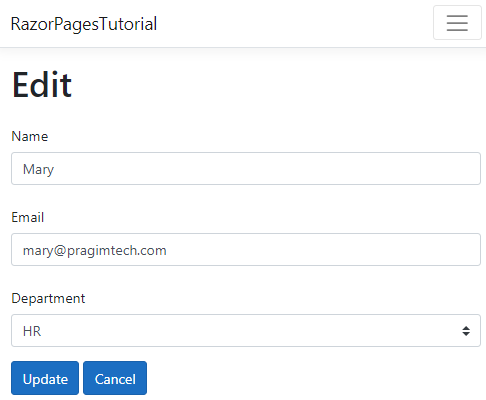
Add a new razor page to the Employees folder. Name it Edit.cshtml. From design standpoint, Edit razor page should look as shown below. Use a textbox to edit emplyee NAME and EMAIL and a select list for DEPARTMENT.
asp.net core razor pages edit form

Edit.cshtml.cs

using Microsoft.AspNetCore.Mvc;
using Microsoft.AspNetCore.Mvc.RazorPages;
using RazorPagesTutorial.Models;
using RazorPagesTutorial.Services;

namespace RazorPagesTutorial.Pages.Employees
{
    public class EditModel : PageModel
    {
        private readonly IEmployeeRepository employeeRepository;

        public EditModel(IEmployeeRepository employeeRepository)
        {
            this.employeeRepository = employeeRepository;
        }

        // This is the property the display template will use to
        // display existing Employee data
        public Employee Employee { get; private set; }

        // Populate Employee property
        public IActionResult OnGet(int id)
        {
            Employee = employeeRepository.GetEmployee(id);

            if (Employee == null)
            {
                return RedirectToPage("/NotFound");
            }

            return Page();
        }
    }
}

Edit.cshtml

If you are new to tag helpers we discussed them in detail from Parts 35 to 40 in our ASP.NET Core tutorial for beginners course.

@page "{id:min(1)}"
@model RazorPagesTutorial.Pages.Employees.EditModel
@{
    ViewData["Title"] = "Edit";
}

<h1>Edit</h1>

<form method="post" class="mt-3">
    @*Use hidden input elements to store employee id which
        we need when we submit the form*@
    <input hidden asp-for="Employee.Id" />

    @*asp-for tag helper takes care of displaying the existing
        data in the respective input elements*@
    <div class="form-group row">
        <label asp-for="Employee.Name" class="col-sm-2 col-form-label">
        </label>
        <div class="col-sm-10">
            <input asp-for="Employee.Name" class="form-control" placeholder="Name">
        </div>
    </div>
    <div class="form-group row">
        <label asp-for="Employee.Email" class="col-sm-2 col-form-label"></label>
        <div class="col-sm-10">
            <input asp-for="Employee.Email" class="form-control" placeholder="Email">
        </div>
    </div>

    <div class="form-group row">
        <label asp-for="Employee.Department" class="col-sm-2 col-form-label"></label>
        <div class="col-sm-10">
            <select asp-for="Employee.Department" class="custom-select mr-sm-2"
                    asp-items="Html.GetEnumSelectList<Dept>()">
                <option value="">Please Select</option>
            </select>
        </div>
    </div>

    <div class="form-group row">
        <div class="col-sm-10">
            <button type="submit" class="btn btn-primary">Update</button>
            <a asp-page="/Employees/Index" class="btn btn-primary">Cancel</a>
        </div>
    </div>
</form>

Changes in _ViewImports.cshtml

Include the following using declaration.

@using RazorPagesTutorial.Models

asp.net core razor pages tutorial

Editing data in asp.net core razor pages - Slides


Handling 404 error in razor pages project

Suggested Videos
Part 10 - Route parameters in asp.net core razor pages | Text | Slides
Part 11 - Route constraints in asp.net core | Text | Slides
Part 12 - ASP.NET core custom route constraint | Text | Slides

In this video we will discuss handling 404 errors in an asp.net core razor pages project.

Consider the following OnGet() action. 


public IActionResult OnGet(int id)
{
    Employee = employeeRepository.GetEmployee(id);

    if(Employee == null)
    {
        return RedirectToPage("/NotFound");
    }

    return Page();
}

  • If the employee with the specified ID is not found, the request is redirected to NotFound razor page using RedirectToPage() method.
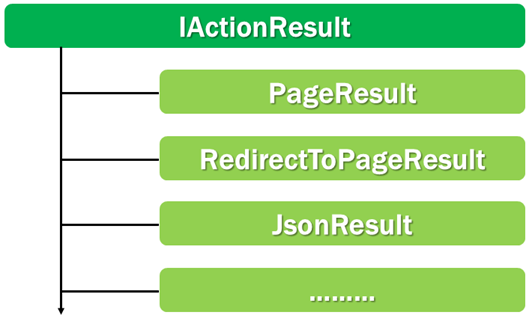
  • OnGet() method return type is IActionResult, where as RedirectToPage() method returns RedirectToPageResult. This is OK because RedirectToPageResult implements IActionResult.
  • If the employee with the specified ID is found we want to re-render the same page. This is done by the Page() method. Page() method returns PageResult which also implements IActionResult interface.
  • Changing the return type of OnGet() action from void to IActionResult allows us to return different result types that implement IActionResult interface.
asp.net core iactionresult interface

NotFound razor page

@page
@{
    ViewData["Title"] = "NotFound";
}

<h1>The resource you are looking for cannot be found</h1>
<a asp-page="/Employees/Index" class="btn btn-primary">
    Click here to go back to Home
</a>

asp.net core razor pages tutorial

Handling 404 error in razor pages project - Slides


ASP.NET core custom route constraint

Suggested Videos
Part 9 - Query string parameters in asp.net core razor pages | Text | Slides
Part 10 - Route parameters in asp.net core razor pages | Text | Slides
Part 11 - Route constraints in asp.net core | Text | Slides

In this video we will discuss creating a custom route constraint in asp.net core.

We discussed built-in route constraints in our previous video. If these built-in route constraints do not meet your application requirements, you may create a custom route constraint.


Creating custom route constraint in asp.net core

To create a custom route constraint implement IRouteConstraint interface. This interface is in Microsoft.AspNetCore.Http namespace.

IRouteConstraint interface has just one method - Match() for which we have to provide implementation. This method returns true if the constraint is satisfied, otherwise false.


public interface IRouteConstraint : IParameterPolicy
{
            bool Match(HttpContext httpContext, IRouter route, string routeKey, 
                       RouteValueDictionary values, RouteDirection routeDirection);
}

IRouteConstraint Match() method parameters

Parameter Description
httpContext Contains information about the HTTP request
route The router that this constraint belongs to
routeKey Contains the name of the route parameter
values A dictionary that contains the route parameter values
routeDirection An object that indicates whether the constraint check is being performed when an incoming request is being handled or when a URL is being generated

Custom route constraint example

Let's say in our project we only want to allow even numbers as valid Employee ID values. We can't use any of the built-in route constraints to enforce this. One way to achieve this is, by creating a custom route constraint.

The following custom EvenConstraint returns true if the employee id value is even otherwise false.

public class EvenConstraint : IRouteConstraint
{
    public bool Match(HttpContext httpContext, IRouter route, string routeKey,
        RouteValueDictionary values, RouteDirection routeDirection)
    {
        int id;

        if (Int32.TryParse(values["id"].ToString(), out id))
        {
            if (id % 2 == 0)
            {
                return true;
            }
        }

        return false;
    }
}

Register custom constraint

To use the custom route constraint, it must be registered with our application's ConstraintMap dictionary. We do this in the ConfigureServices() method of the Startup class.

public void ConfigureServices(IServiceCollection services)
{
    services.Configure<RouteOptions>(options =>
    {
        options.ConstraintMap.Add("even", typeof(EvenConstraint));
    });
}

Using custom route constraint

Once a custom route constraint is registered, it can then be used just like any built-in route constraint.

@page "/employees/view/{id:even}"

asp.net core razor pages tutorial

ASP.NET core custom route constraint - Slides


Route constraints in asp.net core

Suggested Videos
Part 8 - Routing in asp.net core razor pages | Text | Slides
Part 9 - Query string parameters in asp.net core razor pages | Text | Slides
Part 10 - Route parameters in asp.net core razor pages | Text | Slides

In this video we will discuss route constraints in asp.net core. The concepts we discuss here can be used in ASP.NET Core MVC web application, ASP.NET Core Web API and ASP.NET Core razor pages web application.


What is the use of route constraints

Route Constraints are a mechanism to filter out or restrict unwanted route values from reaching the controller action or the Page handler methods in a razor pages application.


The following razor page expects a value for the id route parameter. You can pass any value - numbers, alphabets, combination of both. Any value really.

@page "{id}"

Route parameter values can be constrained by data type and range. To specify a route constraint, include a colon and the constraint. In the following example, id route parameter value must be an integer. If you pass alphabets instead of integer values, you get a 404 error.

@page "{id:int}"

Route constraint parameters

Some constraints accept parameters as well. min constraint can be used to specify a minimum integer value. In our case, an employee ID must be equal to or greater than 1. 

@page "{id:min(1)}"

Multiple route constraints

Multiple Constraints can be combined using a colon. The following example ensures id value is an integer between 1 and 5.

@page "{id:min(1):max(5)}"

The same can be achieved using the range constraint as well. The range constraint takes 2 parameters. The minimum and maximum allowed value.

@page "{id:range(1,5)}"

Optional route parameters and route constraints

In the following example, the route parameter id is optional. To make it optional we have included a question mark at the end of the route parameter.

@page "{id?}"

To make a route parameter optional, when you have constraints specified, you have to include the question mark at the end of all the constraints.

@page "{id:range(1,5)?}"

If you include it immediately after the name of the route parameter, you get RoutePatternException.

@page "{id?:range(1,5)}"

RoutePatternException : The route parameter name 'id?' is invalid. Route parameter names must be non-empty and cannot contain these characters: '{', '}', '/'. The '?' character marks a parameter as optional, and can occur only at the end of the parameter. The '*' character marks a parameter as catch-all, and can occur only at the start of the parameter.

Common built-in route constraints

Constraint Example Use
int {id:int} Only integer values allowed
Similarly other built-in datatypes like decimal, float, double, datetime, bool, long, guid can also be used as constraints
alpha {firstName:alpha} String must contain only alphabets
minlength(value) {firstName:minlength(5)} String must be at least 5 characters
maxlength(value) {firstName:maxlength(10)} String must not be more than 10 characters
length(min,max) {firstName:length(5,10)} String must be at least 5 and not more than 10 characters in length
length(length) {firstName:length(10)} String must be exactly 10 characters in length
min(value) {id:min(1)} Integer value must be at least 1
max(value) {id:max(100)} Integer value must not be more than 100
range(min,max) {id:range(1,100)} Integer value must be between 1 and 100 (inclusive)
regex(expression) String must match the pattern specified by the regular expression

If none of these built-in constraints meet your requirement, you can create a custom constraint. We will discuss custom constraints in our upcoming videos.

asp.net core razor pages tutorial

Route constraints in asp.net core - Slides


Route parameters in asp.net core razor pages

Suggested Videos
Part 7 - List razor page | Text | Slides
Part 8 - Routing in asp.net core razor pages | Text | Slides
Part 9 - Query string parameters in asp.net core razor pages | Text | Slides

In this video we will discuss, route parameters in asp.net core razor pages.

The following is the Pages folder hierarchy in our asp.net core project. 

route parameters in asp.net core razor pages


Index.cshtml displays the list of all employees. Details.cshmtl displays the details of a specific employee. The ID of the employee is passed to the Details razor page as a parameter.


Consider the following example. We are passing Employee ID as a parameter to the Details razor page.

<a asp-page="/Employees/Details" asp-route-ID="@employee.Id">
    View
</a>

By default Employee ID is passed as a query string parameter

https://localhost:12345/employees/details/?id=1

If you want it to be passed as a route parameter instead, use a route template and specify the route parameter. The route template is specified next to the @page directive in .cshtml file. We specify route parameters in curly braces.

@page "{id}"

With the above change, Employee ID is now passed as a route parameter.

https://localhost:12345/employees/details/1/

Relate the path /employees/details/1/ to the following folder hierarchy

razor pages route parameters

By default, the path to the razor page determines the URL at which the page can be reached. 

Details.cshtml page is in the Employees folder. Employees folder is in the root Pages folder. So /employees/details/ID is the path at which Details.cshtml razor page is reachable by default. If you want to change this, you can using the route template.

/employees/details/view/1/ is the URL generated by the following route template. Since, the route template does not start with / or ~/ the route (view/{id}) specified by the route template will be appended to the default root file path /employees/details.

@page "View/{id}"

If the route template starts with / or ~/ then the root file path (/employees/details) is ignored. /employees/view/1/ is the URL generated by the following route template.

@page "/Employees/View/{id}"

You can also pass multiple parameters by including multiple place holders. For example, display employees from Virginia state in the United States.

@page "/Employees/{country}/{state}"

Accessing route parameters

Add a parameter to the OnGet() method with the same name and data type as the route parameter. Model-binding in asp.net core automatically binds the route parameter value to the OnGet() method parameter.

public class DetailsModel : PageModel
{
    public void OnGet(int id)
    {
        Employee = employeeRepository.GetEmployee(id);
    }
}

If you need the route parameter value in the Display Template, then assign the value to a public property. This public property is then available in the Display Template.

public class DetailsModel : PageModel
{
    public int Id { get; set; }

    public void OnGet(int id)
    {
        Id = id;
    }
}

BindProperty in ASP.NET Core

Instead of creating a public property, a method parameter and then assigning the method parameter value to the public property. We can use BindProperty attribute with SupportsGet property set to true.

public class DetailsModel PageModel
{
    [BindProperty(SupportsGet = true)]
    public int Id { get; set; }

    public void OnGet()
    {
        // Id property is available inside this
        // OnGet() method & the Display Template
    }
}

BindProperty and SupportsGet

By default, BindProperty attribute binds values to properties on the PageModel class, only if the request is a POST request. If the request is a GET request, the values are not binded. However, we can set SupportsGet property to true, so even on a GET request the values are bound to properties on the PageModel class.

asp.net core razor pages tutorial