Support us .Net Basics C# SQL ASP.NET Aarvi MVC Slides C# Programs Subscribe Download

Part 15 - Conditional Mapping in entity framework with code first

Suggested Videos
Part 12 - Table splitting in entity framework
Part 13 - Table splitting in entity framework with code first approach
Part 14 - Conditional Mapping in entity framework


In Part 14, we discussed Conditional Mapping in entity framework with database first approach. Please watch Part 14 before proceeding. In this video we will discuss Conditional Mapping in entity framework with code first approach.


Step 1: Create a new empty asp.net web application project. Name it Demo. Install entity framework if it's not already installed.

Step 2: Add a class file to the project. Name it Employee.cs. Copy and paste the following code.
namespace Demo
{
    public class Employee
    {
        public int EmployeeID { get; set; }
        public string FirstName { get; set; }
        public string LastName { get; set; }
        public string Gender { get; set; }
        public bool IsTerminated { get; set; }
    }
}

Step 3: Add a class file to the project. Name it EmployeeDBContext.cs. Copy and paste the following code.
using System.Data.Entity;
namespace Demo
{
    public class EmployeeDBContext : DbContext
    {
        public DbSet<Employee> Employees { get; set; }

        protected override void OnModelCreating(DbModelBuilder modelBuilder)
        {
            modelBuilder.Entity<Employee>()
                .Map(m => m.Requires("IsTerminated")
                .HasValue(false))
                .Ignore(m => m.IsTerminated);

            base.OnModelCreating(modelBuilder);
        }
    }
}

Step 4: Add the database connection string in web.config file.
<connectionStrings>
  <add name="EmployeeDBContext"
            connectionString="server=.; database=Sample; integrated security=SSPI;"
            providerName="System.Data.SqlClient" />
</connectionStrings>

Step 5: Add a webform to the project. Drag and drop a GridView control. 

Step 6: Copy and paste the following code in the code-behind file.
protected void Page_Load(object sender, EventArgs e)
{
    EmployeeDBContext employeeDBContext = new EmployeeDBContext();
    GridView1.DataSource = employeeDBContext.Employees.ToList();
    GridView1.DataBind();
}

Step 7: If you already have Sample database in SQL Server. Delete it from SQL Server Management Studio.

Step 8: Run the application. Sample database and Employees table must be created at this point.

Step 9: Insert test data using the following SQL script
Insert into Employees values ('Mark', 'Hastings', 'Male', 0)
Insert into Employees values ('Steve', 'Pound', 'Male', 0)
Insert into Employees values ('Ben', 'Hoskins', 'Male', 0)
Insert into Employees values ('Philip', 'Hastings', 'Male', 1)
Insert into Employees values ('Mary', 'Lambeth', 'Female', 0)
Insert into Employees values ('Valarie', 'Vikings', 'Female', 0)
Insert into Employees values ('John', 'Stanmore', 'Male', 1)

Step 10: Open SQL profiler and run the webform. Notice that the select query has a WHERE clause, which will always return employees who are not terminated.

SELECT
    [Extent1].[EmployeeID] AS [EmployeeID],
    [Extent1].[FirstName] AS [FirstName],
    [Extent1].[LastName] AS [LastName],
    [Extent1].[Gender] AS [Gender]
    FROM [dbo].[Employees] AS [Extent1]
    WHERE [Extent1].[IsTerminated] = 0
Entity Framework Tutorial

Part 15 - Conditional Mapping in entity framework with code first


Part 14 - Conditional Mapping in entity framework

Suggested Videos
Part 11 - Entity splitting in entity framework with code first approach
Part 12 - Table splitting in entity framework
Part 13 - Table splitting in entity framework with code first approach


In this video we will discuss Conditional Mapping feature in entity framework with database first approach. Let us understand what Conditional Mapping can do with an example.


We will be using the following Employees table in this demo. IsTerminated column determines if an employee is a terminated employee or not.
Conditional Mapping in entity framework

SQL Query to create Employees table
Create table Employees
(
     EmployeeID int primary key identity,
     FirstName nvarchar(50),
     LastName nvarchar(50),
     Gender nvarchar(50),
     IsTerminated bit not null
)
GO

Insert into Employees values ('Mark', 'Hastings', 'Male', 0)
Insert into Employees values ('Steve', 'Pound', 'Male', 0)
Insert into Employees values ('Ben', 'Hoskins', 'Male', 0)
Insert into Employees values ('Philip', 'Hastings', 'Male', 1)
Insert into Employees values ('Mary', 'Lambeth', 'Female', 0)
Insert into Employees values ('Valarie', 'Vikings', 'Female', 0)
Insert into Employees values ('John', 'Stanmore', 'Male', 1)

If the application that we are developing always need only the employees who are not terminated, then in the query we will have to always include the filter across our entire application. Conditional Mapping can be used to apply such a permanent filter on the entity, so that the generated SQL query always have the WHERE clause.

To use Conditional Mapping, 
1. Right click on the entity and select "Table Mapping" option from the context menu
2. Add the condition - When Is Terminated = false
Conditional Mapping example

At this point, if you build the solution or validate the model, you will get the following error
Problem in mapping fragments starting at line 46:Condition member 'Employees.IsTerminated' with a condition other than 'IsNull=False' is mapped. Either remove the condition on Employees.IsTerminated or remove it from the mapping

This is because, a table column cannot be mapped more than once. We have used IsTerminated column in conditional mapping, so it cannot be used in property mapping as well. For this reason delete it from Employee entity.

Add a web form to the project. Drag and drop a GridView control. Copy and paste the following code in the code-behind file.
protected void Page_Load(object sender, EventArgs e)
{
    EmployeeDBContext employeeDBContext = new EmployeeDBContext();
    GridView1.DataSource = employeeDBContext.Employees;
    GridView1.DataBind();
}

Open SQL profiler and run the webform. Notice that the select query has a where clause, which will always return employees who are not terminated.
SELECT
[Extent1].[EmployeeID] AS [EmployeeID],
[Extent1].[FirstName] AS [FirstName],
[Extent1].[LastName] AS [LastName],
[Extent1].[Gender] AS [Gender]
FROM [dbo].[Employees] AS [Extent1]
WHERE [Extent1].[IsTerminated] = 0

Entity Framework Tutorial

Part 14 - Conditional Mapping in entity framework


Part 5 - SQL query to find employees hired in last n months

Suggested Videos:
Part 2 - SQL query to get organization hierarchy
Part 3 - How does a recursive CTE work
Part 4 - Delete duplicate rows in sql


This question is asked is many sql server interviews. If you have used DATEDIFF() sql server function then you already know the answer.


We will be using the following Employees table for this demo.
SQL query to find employees hired in last n months

SQL Script to create the table and populate with test data
Create table Employees
(
     ID int primary key identity,
     FirstName nvarchar(50),
     LastName nvarchar(50),
     Gender nvarchar(50),
     Salary int,
     HireDate DateTime
)
GO

Insert into Employees values('Mark','Hastings','Male',60000,'5/10/2014')
Insert into Employees values('Steve','Pound','Male',45000,'4/20/2014')
Insert into Employees values('Ben','Hoskins','Male',70000,'4/5/2014')
Insert into Employees values('Philip','Hastings','Male',45000,'3/11/2014')
Insert into Employees values('Mary','Lambeth','Female',30000,'3/10/2014')
Insert into Employees values('Valarie','Vikings','Female',35000,'2/9/2014')
Insert into Employees values('John','Stanmore','Male',80000,'2/22/2014')
Insert into Employees values('Able','Edward','Male',5000,'1/22/2014')
Insert into Employees values('Emma','Nan','Female',5000,'1/14/2014')
Insert into Employees values('Jd','Nosin','Male',6000,'1/10/2013')
Insert into Employees values('Todd','Heir','Male',7000,'2/14/2013')
Insert into Employees values('San','Hughes','Male',7000,'3/15/2013')
Insert into Employees values('Nico','Night','Male',6500,'4/19/2013')
Insert into Employees values('Martin','Jany','Male',5500,'5/23/2013')
Insert into Employees values('Mathew','Mann','Male',4500,'6/23/2013')
Insert into Employees values('Baker','Barn','Male',3500,'7/23/2013')
Insert into Employees values('Mosin','Barn','Male',8500,'8/21/2013')
Insert into Employees values('Rachel','Aril','Female',6500,'9/14/2013')
Insert into Employees values('Pameela','Son','Female',4500,'10/14/2013')
Insert into Employees values('Thomas','Cook','Male',3500,'11/14/2013')
Insert into Employees values('Malik','Md','Male',6500,'12/14/2013')
Insert into Employees values('Josh','Anderson','Male',4900,'5/1/2014')
Insert into Employees values('Geek','Ging','Male',2600,'4/1/2014')
Insert into Employees values('Sony','Sony','Male',2900,'4/30/2014')
Insert into Employees values('Aziz','Sk','Male',3800,'3/1/2014')
Insert into Employees values('Amit','Naru','Male',3100,'3/31/2014')

Here is the SQL Query that does the job
-- Replace N with number of months
Select *
FROM Employees
Where DATEDIFF(MONTH, HireDate, GETDATE()) Between 1 and N

sql server interview questions and answers

Part 5 - SQL query to find employees hired in last n months


Part 4 - Delete duplicate rows in sql

Suggested Videos:
Part 1 - How to find nth highest salary in sql
Part 2 - SQL query to get organization hierarchy
Part 3 - How does a recursive CTE work


In this video, we will discuss deleting all duplicate rows except one from a sql server table.


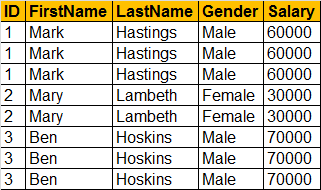
Let me explain what we want to achieve. We will be using Employees table for this demo.
Delete duplicate rows in sql

SQL Script to create Employees table
Create table Employees
(
     ID int,
     FirstName nvarchar(50),
     LastName nvarchar(50),
     Gender nvarchar(50),
     Salary int
)
GO

Insert into Employees values (1, 'Mark', 'Hastings', 'Male', 60000)
Insert into Employees values (2, 'Mary', 'Lambeth', 'Female', 30000)
Insert into Employees values (3, 'Ben', 'Hoskins', 'Male', 70000)

The delete query should delete all duplicate rows except one. The output should be as shown below, after the delete query is executed.
Delete all duplicate rows except one in sql

Here is the SQL query that does the job. PARTITION BY divides the query result set into partitions.
WITH EmployeesCTE AS
(
   SELECT *, ROW_NUMBER()OVER(PARTITION BY ID ORDER BY ID) AS RowNumber
   FROM Employees
)
DELETE FROM EmployeesCTE WHERE RowNumber > 1

sql server interview questions and answers

Part 4 - Delete duplicate rows in sql


Part 3 - How does a recursive CTE work

Suggested Videos:
Part 1 - How to find nth highest salary in sql
Part 2 - SQL query to get organization hierarchy


A lot of you have asked to explain, how a recursive CTE work line by line. If you have not watched Part 2 already, I strongly recommend to watch that video first before proceeding.


In Part 2 of SQL Server Interview questions and answers video series we discussed recursive CTE to retrieve the organization hierarchy.

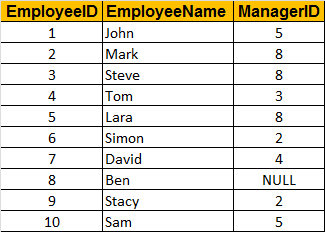
We will be using Employees table to understand how a recursive CTE works.
sql server query to display org chart

Here is the recursive CTE that gets the organization hierarchy based on an EmployeeId. Notice that the recursive CTE has got 2 parts (Anchor & Recursive Member)
Declare @ID int;
Set @ID = 7;

WITH EmployeeCTE AS
(
     -- Anchor
     Select EmployeeId, EmployeeName, ManagerID
     From Employees
     Where EmployeeId = @ID
    
     UNION ALL
    
     -- Recursive Member
     Select Employees.EmployeeId , Employees.EmployeeName, Employees.ManagerID
     From Employees
     JOIN EmployeeCTE
     ON Employees.EmployeeId = EmployeeCTE.ManagerID
)

Select E1.EmployeeName, ISNULL(E2.EmployeeName, 'No Boss') as ManagerName
From EmployeeCTE E1
LEFT Join EmployeeCTE E2
ON E1.ManagerID = E2.EmployeeId

When David's EmployeeId is passed the query produces the following output
how does a recursive cte work

Let's now discuss how the CTE executes line by line.
Step 1: Execute the anchor part and get result R0
Step 2: Execute the recursive member using R0 as input and generate result R1
Step 3: Execute the recursive member using R1 as input and generate result R2
Step 4: Recursion goes on until the recursive member output becomes NULL
Step 5: Finally apply UNION ALL on all the results to produce the final output

sql server interview questions and answers

Part 3 - How does a recursive CTE work