Support us .Net Basics C# SQL ASP.NET Aarvi MVC Slides C# Programs Subscribe Download

Sql vs tsql vs plsql

In this video we will understand the difference between SQL, T-SQL and PL/SQL.

SQL stands for Structured Query Language. So, SQL is a language, specifically, it's a language for relational Databases.

what is sql

What is a relational database and why do we use it

what is relational database

In simple terms a relational database is a collection of tables to store data. The tables are usually related to each other by primary and foreign key constraints
, hence the term Relational Database Management System, in short RDBMS.

For example, let's say we want to store our organisation Employees data. We create a database (EmployeesDB - I named it EmployeesDB, but you can give it any meaningful name you want) and in this database we create 3 tables.

  • Departments - To store the list of all departments
  • Gender - To store different genders (Male and Female for example)
  • Employees - To store the list of all employees

To create the database itself, tables, relationships and to insert, update, delete and even select data we use SQL - Structured Query Language. So, in simple terms, SQL is a database language, we use it on a Database to create database objects like tables, views, functions etc. We also use it to insert, update, delete and select data.

What is T-SQL and PL/SQL and how is it different SQL

Well you can think of SQL as a standard database language. It was initially developed by IBM and later ANSI (American National Standards Institute) made it a standard. So, SQL is an ANSI standard and based on it different database vendors like Microsoft, Oracle and many other organisations developed their own database query language.

what is sql with example

Standards are always good, because they allow us to write similar queries across different relational database management systems. Different vendors like Microsoft and Oracle for example, support most of the features of the ANSI SQL standard, however, these database vendors also include their own non-standard features that extend the standard SQL language.

So the database that is developed by Microsoft is called Microsoft SQL Server or MS SQL Server for short. The language that Microsoft developed to query SQL Server database is called Transact-SQL or T-SQL for short.

sql vs transact sql

Similarly Oracle corporation developed a database management system called Oracle and the language that we use to query oracle database is PL/SQL. By the way, PL stands for Procedural Language.

So, you can think of SQL as a subset of T-SQL and PL/SQL. A word of caution here, both T-SQL and PL/SQL does not implement 100% of the feature set of standard SQL, but majority of the standard features are implemented. You can see that from the diagram below. Although, not entirely true, you can still think SQL is almost a subset of T-SQL and PL/SQL. This means if you know T-SQL or PL/SQL, then you already know the standard SQL.

Sql vs tsql vs plsql

The standard SQL is same across all database vendors. This means if you know the standard SQL, then you know how to do most of the basic things on most of the database management systems like SQL Server, Oracle, MySQL, PostgreSQL etc. If you ware wondering what is MySQL and PostgreSQL, well, just like SQL Server and Oracle, they are also relational database management systems.

what is t-sql

Summary

  • SQL is the standard database language
  • Based on this standard SQL, database vendors like Microsoft, Oracle and many other organizations developed their own database query languages
  • TSQL is a proprietary procedural language for working with Microsoft SQL Server database
  • Similarly, PL/SQL is a proprietary procedural language for working with Oracle database
  • T-SQL and PL/SQL are an extension to standard SQL. 
  • This means they have more features and functions than the standard SQL. 
  • For example, features such as local variables are added. Similarly many, many built-in functions are added for processing strings, numbers, dates and other types of data.
  • They also added the capability to write stored procedures.

In short these procedural languages like T-SQL and PL/SQL for example, helps us in writing queries easier, quicker and more efficiently.

If you want to learn SQL and T-SQL, please check out our SQL Server tutorial for beginners course. We have covered everything you need, from the basics to advanced SQL concepts.

SQL Scripts

Create Database EmployeesDB
Go

Use EmployeesDB
Go 

Create table Departments
(
       Id int primary key identity,
       [Name] nvarchar(50)
)
Go 

Create table Gender
(
       Id int primary key identity,
       Gender nvarchar(20)
)
Go 

Create table Employees
(
       Id int primary key identity,
       [Name] nvarchar(50),
       DeptId int foreign key references Departments(Id),
       GenderId int foreign key references Gender(Id)
)
Go 

Insert into Departments values ('IT')
Insert into Departments values ('HR')
Go 

Insert into Gender values ('Male')
Insert into Gender values ('Female')
Go 

Insert into Employees ([Name], DeptId, GenderId) values ('Mark', 1, 1)
Insert into Employees ([Name], DeptId, GenderId) values ('Mary', 1, 2)
Insert into Employees ([Name], DeptId, GenderId) values ('John', 2, 1)
Insert into Employees ([Name], DeptId, GenderId) values ('Sara', 2, 2)
Insert into Employees ([Name], DeptId, GenderId) values ('Steve', 2, 1)
Go

Select * from Departments
Select * from Gender
Select * from Employees 

Select Employees.Name as [Name], Departments.Name as Department, Gender.Gender as Gender
from Employees
join Departments on Employees.DeptId = Departments.Id
join Gender on Employees.GenderId = Gender.Id

Sql query to delete parent child rows

In this video we will answer an interview question faced by one of our YouTube channel subscribers in a SQL Server Interview. To be able to answer this SQL question and any related follow up questions, you need to have a good understanding of

  • Foreign Key Constraints
  • Cascading Deletes and
  • Transactions

We discussed these concepts in detail in our SQL Server tutorial for beginners course. The following is the link.

https://www.youtube.com/playlist?list=PL08903FB7ACA1C2FB

The question in the interview goes like this - We have two tables - Table A and Table B. If I delete a row from table A, all the related rows in table B must also get deleted. How do we achieve this in SQL Server.

sql query to delete parent child records

To give it a bit more context and clarity, instead of Table A and Table B, let's use Departments and Employees tables.

delete from multiple tables sql server

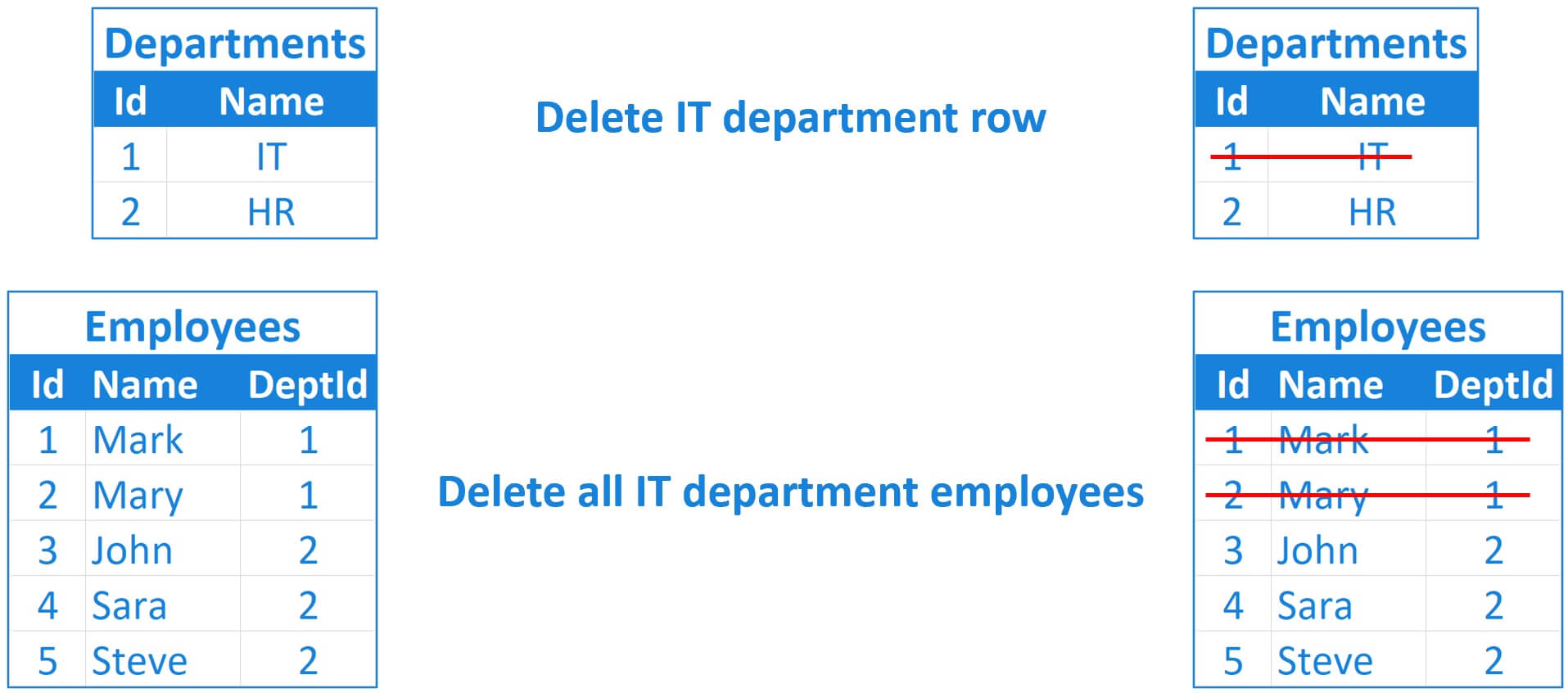
When a row from Departments table is deleted, all the related rows from the Employees table must also be deleted. For example, if we delete the IT department row from the Departments table, we also want all the employees of the IT department to be deleted from the Employees table as well.

Delete parent child rows in SQL

DeptId column in the Employees table is a foreign key referencing Id column in the Departments table.

sql server foreign key cascade delete

So, when a row is deleted from the Departments table, we also want all that department employees to be deleted from the Employees table. Considering the fact that DeptId is a foreign key, the correct way to achieve this is by enforcing cascade deletes.

Error - DELETE statement conflicted with the REFERENCE constraint

If we try to delete a row from the Departments table and if that department has related rows in the Employees table, by default, we get the following REFERENCE CONSTRAINT error

The DELETE statement conflicted with the REFERENCE constraint "FK__Employees__DeptI__38996AB5". The conflict occurred in database "TestDB", table "dbo.Employees", column 'DeptId'.

SQL Server Foreign Key Constraint Cascade Delete

First, drop the existing foreign key constraint

Alter table Employees drop constraint Constraint_Name

Recreate the foreign key constraint with cascading deletes

Alter table Employees
add constraint FK_Dept_Employees_Cascade_Delete
foreign key (DeptId) references Departments(Id) on delete cascade

With foreign key constraint cascade deletes in place, when we delete a row from the Departments table, all the related rows from the Employees table are also automatically deleted.

Same foreign key in multiple tables

What if we have the same foreign key in multiple tables? In the following example, in both the tables (Teachers and Students) GenderId is foreign key referencing Id column from the Gender table.

same foreign key in multiple tables

Well, same idea, with foreign key cascading deletes on, when a row from the Gender table is deleted, all the related rows from both the tables (i.e Teachers and Students) are also deleted automatically.

What if we do not have a foreign key constraint or we do not want to turn on cascade deletes

Well, in that case you can use a sql query like the following to do the deletes yourself. First delete the rows from the child tables and then from the parent table. We are using a SQL transaction to treat all the DELETE queries as one unit. All of the DELETES should succeed. If one of the DELETE query fails for some reason, rollback the transaction and UNDO the deletes.

Begin Try

       Begin Tran 

       Declare @GenderToDelete int =

       -- Delete first from child tables
       Delete from Teachers where GenderId = @GenderToDelete
       Delete from Students where GenderId = @GenderToDelete 

       -- Finally Delete from parent table
       Delete from Gender where Id = @GenderToDelete 

       Commit Tran
End Try 

Begin Catch

       Rollback Tran

End Catch

Please note : Always delete child records before deleting parent record, otherwise if a foreign key constraint is introduced later, your queries will start to fail.

SQL Script for tables (Departments and Employees)

Create table Departments
(
       Id int primary key identity,
       [Name] nvarchar(50)
)
Go

Create table Employees
(
       Id int primary key identity,
       [Name] nvarchar(50),
       DeptId int foreign key references Departments(Id)
)
Go 

Insert into Departments values ('IT')
Insert into Departments values ('HR')
Go 

Insert into Employees values ('Mark', 1)
Insert into Employees values ('Mary', 1)
Insert into Employees values ('John', 2)
Insert into Employees values ('Sara', 2)
Insert into Employees values ('Steve', 2)

SQL Script for tables (Gender, Teachers and Students)

Create table Gender
(
       Id int primary key identity,
       Gender nvarchar(20)
)
Go 

Create table Teachers
(
       Id int primary key identity,
       [Name] nvarchar(50),
       GenderId int foreign key references Gender(Id) on delete cascade
)
Go

Create table Students
(
       Id int primary key identity,
       [Name] nvarchar(50),
       GenderId int foreign key references Gender(Id) on delete cascade
)
Go

Insert into Gender values ('Male')
Insert into Gender values ('Female')
Go

Insert into Teachers values ('Mark', 1)
Insert into Teachers values ('John', 1)
Insert into Teachers values ('Mary', 2)
Insert into Teachers values ('Sara', 2)
Insert into Teachers values ('Flo', 2)
Go

Insert into Students values ('David', 1)
Insert into Students values ('Ron', 1)
Insert into Students values ('Jess', 2)
Insert into Students values ('Tara', 2)
Insert into Students values ('Innes', 2)
Go

Alter table Teachers
add constraint FK_Gender_Employees
foreign key (GenderId) references Gender(Id)

Alter table Students
add constraint FK_Gender_Students
foreign key (GenderId) references Gender(Id)